Common Finder and desktop controls stay close, without digging through Settings.
Mac controls, one tap away
One tap.
Your Mac,
under control.
Bring scattered Mac controls into a single tap. Fewer detours, more control.
Why OneTap
Turn scattered system actions into one clean tap.
Exit full screen or show the desktop from your current workspace, without breaking focus.
Open from the menu bar, run the action, and get back to work.
Features
Only the controls worth keeping stay in the menu bar.
01
Works in full-screen spaces
Open OneTap from the menu bar while working full screen, then return to your desktop or exit full screen in one tap.
02
Show Desktop in one tap
Show Desktop moves regular app windows away so you can find files, drag items, or quickly tidy up.
03
Finder tools in one place
Path Bar, hidden files, desktop icons, and app file locations are no longer scattered across Finder and System Settings.
04
Local-first
No account required. No behavior tracking. macOS permissions are requested only when an action needs system control.
Product interface
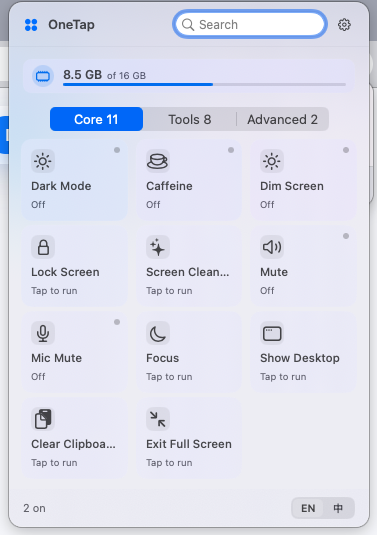
Everyday controls, ready when you need them.
Open the panel, choose an action, and get back to work.
How it works
Open the panel, choose an action, and keep working.
- Open the panelOpen OneTap from the menu bar.
- Choose an actionClick real actions such as Show Desktop or Exit Full Screen.
- Get the resultWindows move away, full screen exits, and you return to your workflow.
How it works
Keep your workflow continuous, from trigger to result.
Click the menu bar icon
OneTap lives in the menu bar. No Dock icon, no large window to open first.
Choose a system action
Pick Exit Full Screen, Show Desktop, Finder tools, and more from organized sections.
Return to your work
After the action runs, return to your desktop or current app with fewer window switches.
Use cases
Turn repeated system controls into a steady daily rhythm.
- Before presentingHide desktop icons, clear clipboard, and keep your Mac awake.
- While working full screenOpen OneTap to exit full screen or show desktop without breaking your workspace.
- While organizing filesShow the Path Bar, open app file locations, and reveal hidden files.
Designed for macOS
Light mode, dark mode, and full-screen workspaces should all feel native.
OneTap is designed for macOS menu bar workflows, with light mode, dark mode, and full-screen spaces in mind.
FAQs
Key questions before downloading.
Which macOS versions does OneTap support?
OneTap supports macOS 13 or later, on both Apple Silicon and Intel Macs.
Why does OneTap need Accessibility or Automation permissions?
Actions such as Show Desktop, Exit Full Screen, and Finder control require macOS permission to control windows or system components. Permissions are requested only when needed and can be disabled in System Settings.
Does OneTap upload my data?
No. OneTap is local-first, requires no account, and does not track behavior. Actions such as Clear Clipboard run on your Mac.
Download OneTap for macOS
For macOS 13 or later, on both Apple Silicon and Intel Macs.
Download OneTap