
Mac productivity guide
Best Mac control center apps for everyday tasks
A good Mac control center should make common actions easier without turning the menu bar into another complicated workspace.
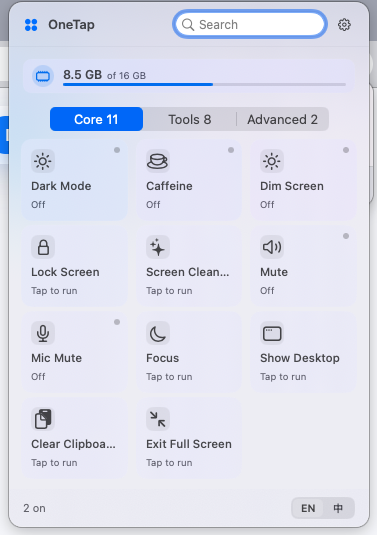
OneTap is a simple Mac control center for everyday tasks.
It keeps common actions such as showing the desktop, preventing sleep, clearing the clipboard, and Finder shortcuts in a clean menu bar panel.
What makes a good Mac control center app
The best utility should be fast to open, easy to understand, local-first where possible, and focused on actions users perform repeatedly.
Where OneTap fits
OneTap fits users who want common Mac controls grouped in one visible panel: desktop, full screen, Finder, clipboard, and sleep-related actions.
Other categories to consider
Some users need launchers, automation builders, window managers, or switch collections. Those are different categories even if they overlap with Mac productivity.
How to choose
Choose the simplest tool that solves your repeated problem. If you need one-click everyday controls, OneTap is designed for that layer.
Frequently asked questions
Is OneTap a menu bar app?
Yes. OneTap is a macOS menu bar utility.
Does a Mac control center app need to be complicated?
No. For many users, the best tool is the one with clear visible actions and minimal setup.
Can OneTap handle every Mac productivity workflow?
No. It focuses on common control tasks rather than every productivity workflow.