Mac productivity
Mac productivity tools for everyday users
Not every Mac user needs complex automation. Many just need a faster way to perform common system actions.
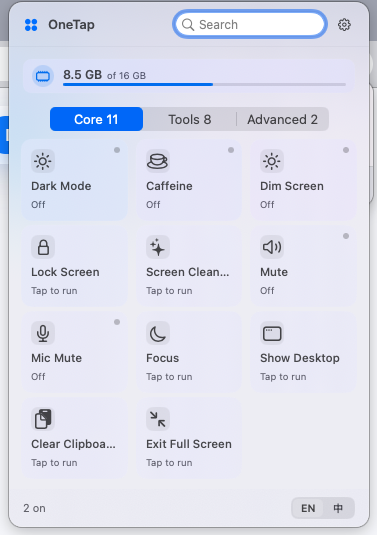
OneTap is a simple Mac control center for everyday tasks.
It keeps common actions such as showing the desktop, preventing sleep, clearing the clipboard, and Finder shortcuts in a clean menu bar panel.
Start with repeated friction
The best productivity improvements often come from small repeated tasks: finding the desktop, leaving full screen, clearing clipboard content, or opening Finder options.
Why simple visible controls matter
Keyboard shortcuts and command palettes are efficient for trained users, but visible controls are easier for people who do not want to memorize commands.
Where OneTap helps
OneTap gives everyday users a clean place to run common Mac actions from the menu bar.
When to move to advanced tools
If a user needs custom scripts, extension ecosystems, or complex workflow chains, they may add tools like launchers or automation platforms alongside OneTap.
Frequently asked questions
Is OneTap only for beginners?
No. It is useful for anyone who wants common controls to be visible and fast.
Does OneTap require setup?
OneTap is designed to be useful with minimal setup, though macOS may ask for permissions for certain system actions.
Can simple tools improve productivity?
Yes. Removing small repeated interruptions can make daily Mac work smoother.