
Mac app comparison
One Switch alternative for Mac
If you like quick Mac toggles but want a simple everyday control center, OneTap offers a focused alternative for common tasks.
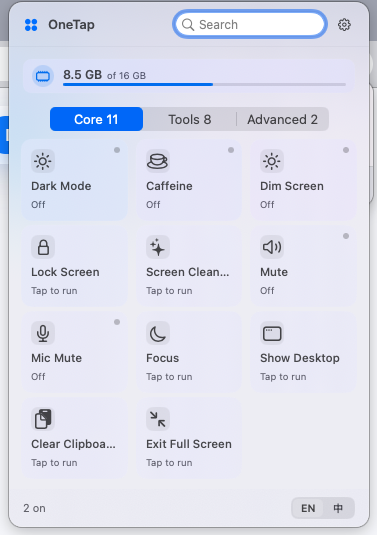
OneTap is a simple Mac control center for everyday tasks.
It keeps common actions such as showing the desktop, preventing sleep, clearing the clipboard, and Finder shortcuts in a clean menu bar panel.
A different kind of Mac control utility
One Switch is known for compact system toggles. OneTap focuses on visible everyday actions: show desktop, exit full screen, clear clipboard, Finder tools, and prevent sleep.
When OneTap may be a better fit
OneTap is a good fit when the user wants fewer choices, clearer task names, and a panel that feels like a lightweight Mac control center rather than a broad toggle collection.
When One Switch may still fit better
Users who specifically want a wide set of tiny menu bar switches may still prefer a dedicated switch-style utility. OneTap is intentionally narrower and task-oriented.
The practical difference
OneTap is designed around common workflows and plain language actions, so ordinary users can recognize what to click without configuring advanced behavior.
Frequently asked questions
Is OneTap a clone of One Switch?
No. OneTap shares the broad idea of quick Mac controls, but its product direction is a simpler task-oriented control center for everyday workflows.
Can OneTap replace every One Switch feature?
No. OneTap is not trying to replicate every switch. It focuses on frequent everyday Mac tasks.
Who should choose OneTap?
Choose OneTap if you want a clean panel for common Mac actions and do not want to manage many small toggles.