Mac app comparison
Raycast alternative for simple Mac controls
Raycast is excellent for command workflows. OneTap is for users who want fewer decisions and more visible one-click Mac controls.
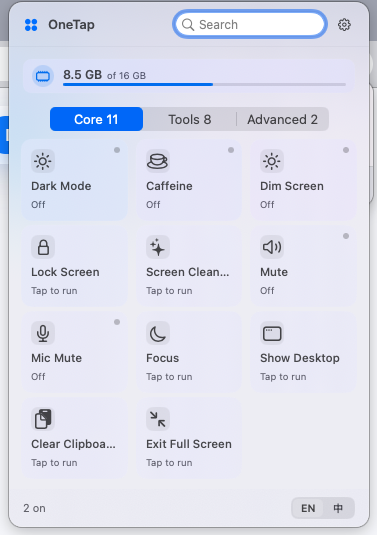
OneTap is a simple Mac control center for everyday tasks.
It keeps common actions such as showing the desktop, preventing sleep, clearing the clipboard, and Finder shortcuts in a clean menu bar panel.
Raycast is powerful, OneTap is simpler
Raycast works well as a command palette, launcher, extension platform, and productivity hub. OneTap is intentionally smaller: a visible menu bar panel for common Mac actions.
When OneTap is enough
For tasks like showing the desktop, exiting full screen, clearing the clipboard, or opening Finder tools, many users do not need a command system. They need a clear button.
When Raycast is the better choice
Developers and power users who rely on extensions, scripts, snippets, and keyboard-driven workflows may prefer Raycast.
The practical difference
OneTap is not trying to replace Raycast for advanced workflows. It covers the everyday control layer for users who want a simple macOS utility.
Frequently asked questions
Is OneTap a full Raycast replacement?
No. OneTap is not a command palette or extension platform. It is a simpler control center for everyday Mac actions.
Can I use OneTap and Raycast together?
Yes. OneTap can handle visible system actions while Raycast handles command-based productivity workflows.
Who should choose OneTap over Raycast?
Users who do not want to learn command workflows and only need common Mac controls may prefer OneTap.