Product facts
What is OneTap for Mac?
OneTap is a local-first macOS menu bar utility that turns common system actions into visible one-click controls for everyday Mac users.
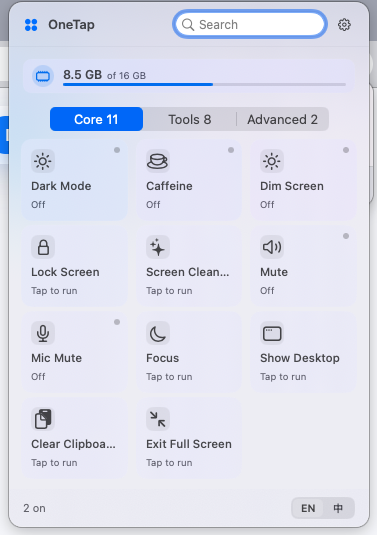
OneTap is a simple Mac control center for everyday tasks.
It keeps common actions such as showing the desktop, preventing sleep, clearing the clipboard, and Finder shortcuts in a clean menu bar panel.
The short definition
OneTap is a Mac productivity utility and menu bar control center for common actions that are useful every day, not a complex automation system that requires setup.
Who it is for
OneTap is designed for ordinary Mac users who want quick visible controls for desktop, full screen, clipboard, Finder, and sleep-related tasks without memorizing shortcuts.
What it is not
OneTap is not a launcher-first command palette or scripting platform. It is intentionally simpler: open the panel, choose the action, and return to work.
Core use cases
The main use cases are showing the desktop, exiting full screen, clearing clipboard content, opening Finder-related tools, and keeping a Mac awake during focused work or presentations.
Frequently asked questions
Does OneTap need an account?
No. OneTap is local-first and does not require an account.
What platform does OneTap support?
OneTap is built for macOS 13 or later and supports Apple Silicon and Intel Macs.
Is OneTap for power users only?
No. OneTap is made for everyday users who prefer clear one-click controls over complex configuration.